To sell a single animal proceed as follows:
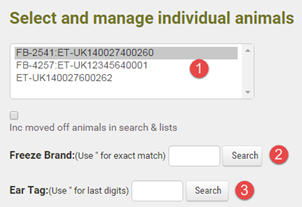
1.Go to Herd Manager > List Herd. Use one of the following search methods or scroll through the herd list to locate the required animal
|
Scroll through the list and single left click on the required animal identity to display its details |
|
search by management tag number. Type a double quote (") before the number to search for an exact match |
|
search by Government ID number. Type a double quote for an exact match or enter the last few digits for a partial match. All matching tags will be displayed in the grid list below when you click Search |


2.The search results may return one or more animal identities. Click on the required ear tag number in the list. The selected animal's details will display to right side of the screen.
3.Click the Sale button and complete the sale detail on the following screen The mandatory data items are the Date of the "Off" movement and the sestination premises. If the destination premises is not in the drop down list, select "Other, enter value >" and enter the new premises name in the text box to the right.
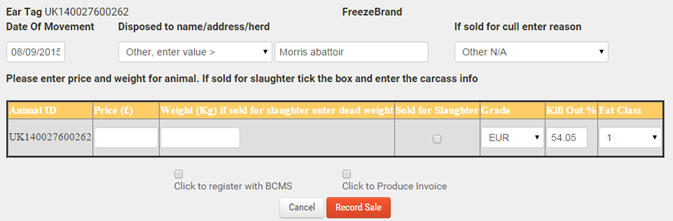
4.If you wish to report the "Off" movement to BCMS/APHIS, tick the Register box.
5.You can optionally create an invoice for the sale details
6.Click Record Sale. The animal's status will changed to "Sold" and the movement set as pending notification to BCMS/APHIS
Tip: If you need to inspect the details of a previously sold animal, go to Herd Manager > List Herd and tick the "Inc moved off animals" box and then use one of the search functions. The animal details will display with the date of sale
