To record individual weights for a batch of animals, use the Batch Manager as follows:
1.Go to the Herd Manager main menu and click on Batch Manager
2.Select the list of animals to be sold by typing in a list of animal IDs, applying a filter or selecting from the list box
3.Click the Record Event button and then the Batch Weigh button. A data entry grid will display
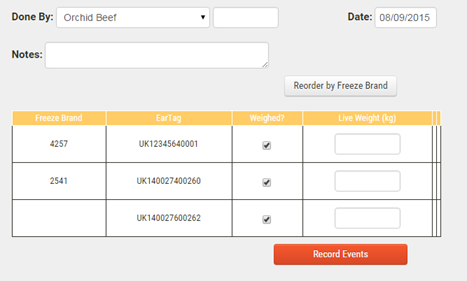
4.Use the Done By drop down list to select the name of the person who carried out the weighing operation or use the "Other, enter value >" list item to enter a new name in the text box to the right. Select the weigh date and enter any Notes
5.Within the data grid, enter the weight (kg) against each animal record
6.Click Record Events to save the data
