To record a weight for a single animal:
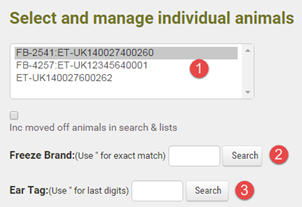
1.Go to Herd Manager > List Herd. Use one of the following search methods or scroll through the herd list to locate the required animal
|
Scroll through the list and single left click on the required animal ear tag to display its details |
|
search by management tag number. Type a double quote (") before the number to search for an exact match |
|
search by ear tag (Government ID). Type a double quote for an exact match or enter the last few digits for a partial match. All matching tags will be displayed in the grid list below when you click Search |


2.The search results may return one or more animal identities. Click on the required ear tag number in the list. The selected animal's details will display to right side of the screen
3.Click on Add Weighing Event and enter the weight in kilograms with the date and name of the person who recorded the weight. You can optionally enter any Notes
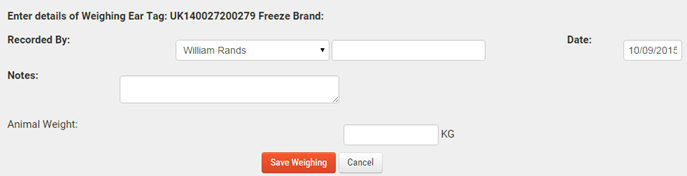
4.Click Save Weighing to save the record into your FarmWizard account
