You can mark animals as sold and import electronic Kill Out data in the same operation. This is useful if you don't wish to mark animals as sold in FarmWizard until you receive the Kill data i.e. the beef processor may have reported your "Off" movements for you.
If the data file contains details of animals in other FarmWizard herds, these will also be updated when you run the function from within the Current Herd.
To load Kill Data, proceed as follows:
1.Go to the Beef Manager main menu and click on Download Kill Info under the Beef Performance Manager sub-menu
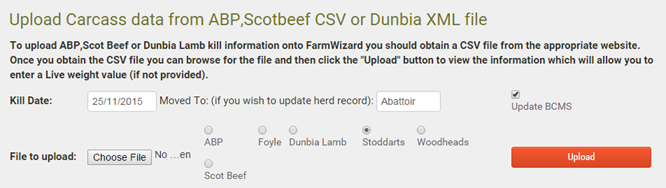
2.If you want to mark the animals as sold, select the Kill Date and enter the name of the destination. Tick Update BCMS if you need to report the movement to BCMS
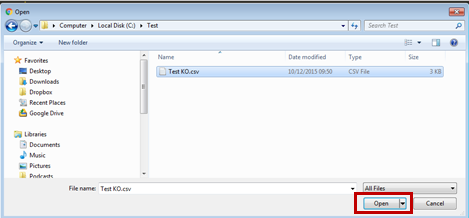
3.Select the name of the beef processor and click Choose File. Browse to the folder where the data file is saved, select it with a single left-click and click Open
4.Click the Upload button. Animals in the data file that are matched in FarmWizard will be displayed in a grid. Any animals that are not matched will be shown in red (shown below)
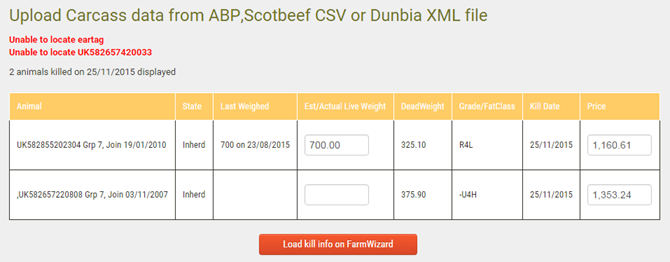
5. You can now optionally enter a value for each live weight. To update the animal data in FarmWizard, click Load kill info on FarmWizard.
6.When the update is complete, a message will display showing the number of animals updated. If animals were found in more than one herd, the numbers will be itemised (shown below)

