To record a medicine treatment or action for a single animal, you must have first added medicine stocks to your FarmWizard account
1.Go to Herd Manager > List Herd. Use one of the following search methods or scroll through the herd list to locate the required animal
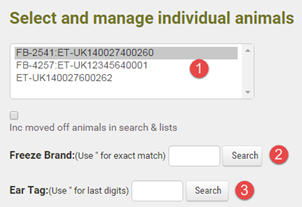
|
Scroll through the list and single left click on the required animal ear tag to display its details |
|
search by management tag number. Type a double quote (") before the number to search for an exact match |
|
search by Government ID number. Type a double quote for an exact match or enter the last few digits for a partial match. All matching tags will be displayed in the grid list below when you click Search |


2.Click the Add Treatment button. A new date entry form will display
3.To record a veterinary action (no medicine usage):
a.Select the veterinary action type from "non-medical activity" drop down list
b.Select the name of the person carrying out the action from the drop down list or select "Other, enter value >" to enter a new person
c.Select the treatment reason from the drop down list or select "Other, enter value >" to enter a new reason
d.Select the date the treatment was administered and the date it was finished (for non-medicine actions, these dates may be the same)
e.Enter any general notes or for 7 day follow up
4.To record a medicine treatment:
a.Select the Quantity of medicine administered and select the medicine stock item used. The stock item drop down shows all stock items with the medicine name, batch number, expiry date and quantity remaining in stock
b.If a second medicine is being administered, complete the detail as above using the Additional Treatment drop down boxes
c.Select the name of the person carrying out the action from the drop down list or select "Other, enter value >" to enter a new person
d.Select the treatment reason from the drop down list or select "Other, enter value >" to enter a new reason
e.Select the date the treatment was administered and the date it was finished
f.Enter any general notes or for 7 day follow up
5.Click Add Entry to save the record. In situations where a third of fourth medicine is administered, click Add Entry & Record Another
