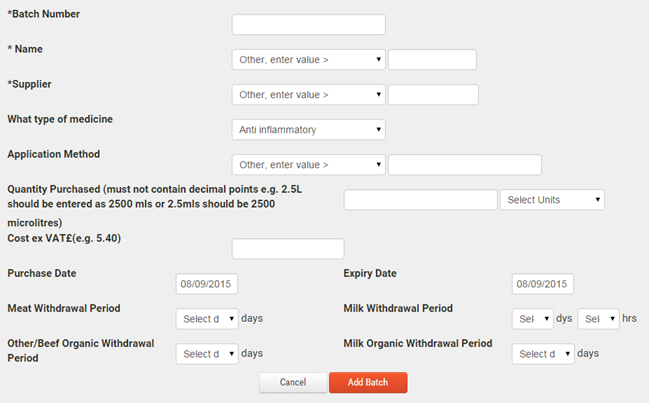
Before you can record medicine treatments against animal tag numbers, you must add medicine stocks to your FarmWizard account. We recommend that you carry out a quick stock take of your medicine cupboard to add existing stocks to the system. New items can be added as they are delivered.
To add a new medicine stock item:
1.Go to Herd Manager and click on Add Vet Medicine under the Vet Centre sub menu
2.A data form will display for the details of the new stock item. The mandatory data items (marked with an asterisk) are:
oBatch Number
oName
oSupplier
oPurchase Date (defaults to "today")
oExpiry Date (defaults to "today")
Care should be taken when setting the Units of the Quantity Purchased as the system cannot accept decimal points e.g. 2.5 litres should be entered as 2500
The meat withdrawal period should be checked and entered from the drug manufacturer's literature
Entering the Cost is optional.
3.Click Add Batch to save the new medicine stock item. The new stock item will display in the drop down list of medicines within the animal treatment screens