FarmWizard produces a range of beef performance reports on a herd or individual animal basis. These reports are accessed from the Beef Performance sub menu under the Reports main menu.
Analysing Recorded Weights
To analyse animal weights go to Reports > Beef Performance and click on Weigh Analysis. A data grid will display all weights from the last 12 months grouped by date.
To view all the animals weighed on a listed date:
For the required date, click on Click for List in the Table View column. A data grid will display showing each animal identity with it's current weight and weigh history. Daily Live Weight Gain (DLWG) is also shown.
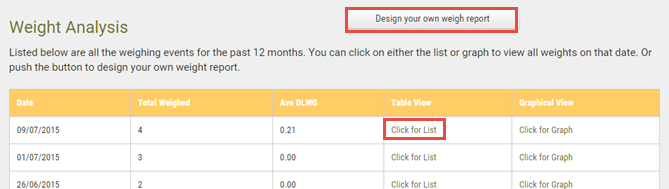
To create a custom weigh analysis report:
1.Click on Design your own weigh report
2.Select animals to include in the report. There are two ways to do this:
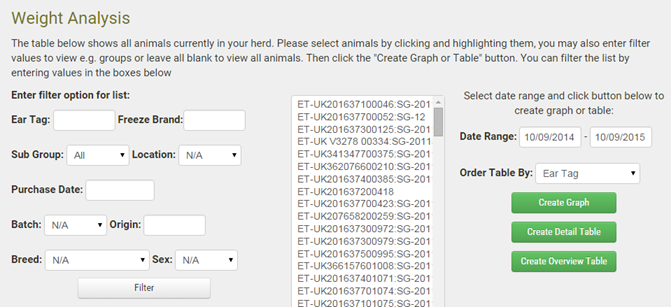
oDefine a filter by selecting from the drop down lists and entering text into the text boxes. Click Filter to select the animals
oSelect animals from the list box. Hold down the Ctrl key on your keyboard and left click on animal IDs while scrolling down the list
3.Select a Date Range and optionally set a sort order for the report
4.Pres the required button to generate the report:
oCreate Graph - a line graph of the selected weigh data
oCreate Detail - a data grid showing additional detail e.g. days on farm, sire identity
oCreate Overview Table - basic information, including daily liveweight gain