The FarmWizard BCSM Interface includes a report that compares the animal IDs listed in the FarmWizard Herd Register with your CTS "cattle on holding" list.
It's recommended that you run this report frequently to check that your farm records are always synchronised with the Government database.
To run the Difference Report, go to the Herd Manager main menu then click on Differences under the BCMS Interface sub menu. The report may take up to a minute to run, and is split into three sections:
•Animals on BCMS but not on FarmWizard
•Animals on FarmWizard but not on BCMS
•Animals whose details differ on BCMS and FarmWizard
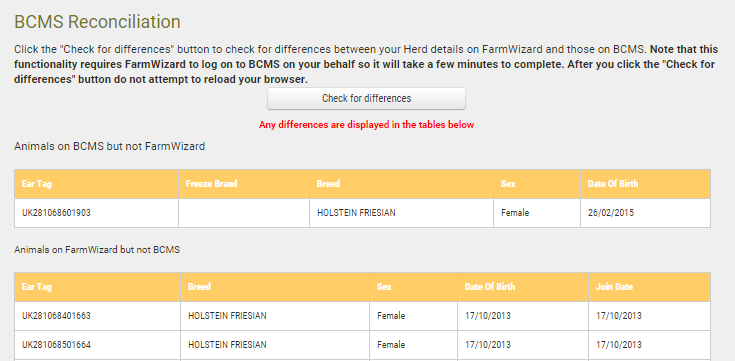
A few examples of how discrepancies can occur:
Animals on BCMS but not in FarmWizard
•Movements “On” or new births have been reported to BCMS by other means e.g. CTS Online or telephone
Animals in FarmWizard but not on BCMS
•Animals have been sold through a livestock market , which has reported the “Off” movement on your behalf
•Animals have moved off your holding but the “Off” movement has been reported by other means e.g. CTS Online or telephone
“Missing” animals
If you appear to have some missing animals when you log into your FarmWizard account for the first time, it could be for the following reasons:
•The missing animals are currently on another holding for rearing or temporary grazing purposes (but are still in your ownership)
•The animals moved onto your holding close to the time your animal list was downloaded into your FarmWizard account. The CTS Online system works on a 24 hour update cycle. Animals that were reported moving “On” the day before your cloud account was created might not have been included in the download list. CTS update delays can also sometimes occur with imported animals
